

Your Digital Solar Power: Mastering the Monitoring App in California
In the Golden State, where sunshine is abundant and energy costs can be steep, solar power isn't just a trend—it's a strategic investment in your home's future. But installing a solar system is just the first step. To truly maximize your returns, ensure longevity, and maintain peak performance, you need a powerful tool at your fingertips: your solar monitoring app.
Far beyond a simple novelty, your solar monitoring app is the digital command center for your home's energy ecosystem. It’s where data comes alive, transforming complex energy flows into understandable insights. For California homeowners, where energy regulations like NEM 3.0 and the threat of PSPS events constantly shift the landscape, understanding and proactively using your app is more crucial than ever.
This comprehensive guide from Powercore Inc, your trusted California dual-licensed General B & C-10 Electrical Contractor, will take you beyond the initial setup. We'll show you how to decode your app's data, troubleshoot potential issues, optimize for California's unique energy environment, and ultimately, safeguard your solar investment for years to come. Get ready to transform your smartphone into a powerful solar management tool.
Why Your Solar Monitoring App is Non-Negotiable in California
California's energy environment is arguably the most dynamic in the nation. From fluctuating Time-of-Use (TOU) rates to the evolving Net Energy Metering (NEM) policies and the persistent threat of Public Safety Power Shutoffs (PSPS), homeowners need every advantage to maintain energy independence and financial savings. Your solar monitoring app provides that advantage.
Real-Time Insights for Smart Decisions
Gone are the days of guessing your energy production. Your app provides instant visibility into:
- Live Production: See exactly how much electricity your panels are generating at any given moment. This allows you to understand the impact of weather, time of day, and even seasonal changes.
- Home Consumption: Many modern apps integrate with smart meters or consumption monitors, showing you how much electricity your home is actively using. This is invaluable for identifying energy hogs or understanding your baseline usage.
- Grid Interaction: Know whether you're sending excess power back to the grid (exporting), drawing power from the grid (importing), or running entirely on self-generated power.
These real-time insights empower you to make informed decisions, like running the dishwasher during peak solar production or managing your EV charging schedule to align with lower grid rates or abundant solar energy.
Early Problem Detection and Prevention
One of the most significant benefits of your monitoring app is its ability to act as an early warning system. Solar systems are robust, but like any technology, components can face issues. Without an app, a drop in production might go unnoticed for weeks or even months, costing you significant savings.
- Performance Anomalies: A sudden, unexplained drop in production can signal dirty panels, shading issues, or even a technical fault with an inverter or individual panel (if you have microinverters or optimizers).
- System Alerts: Most apps will notify you immediately if there's a system error, an inverter goes offline, or communication issues arise. This allows for swift action before minor issues become costly repairs.
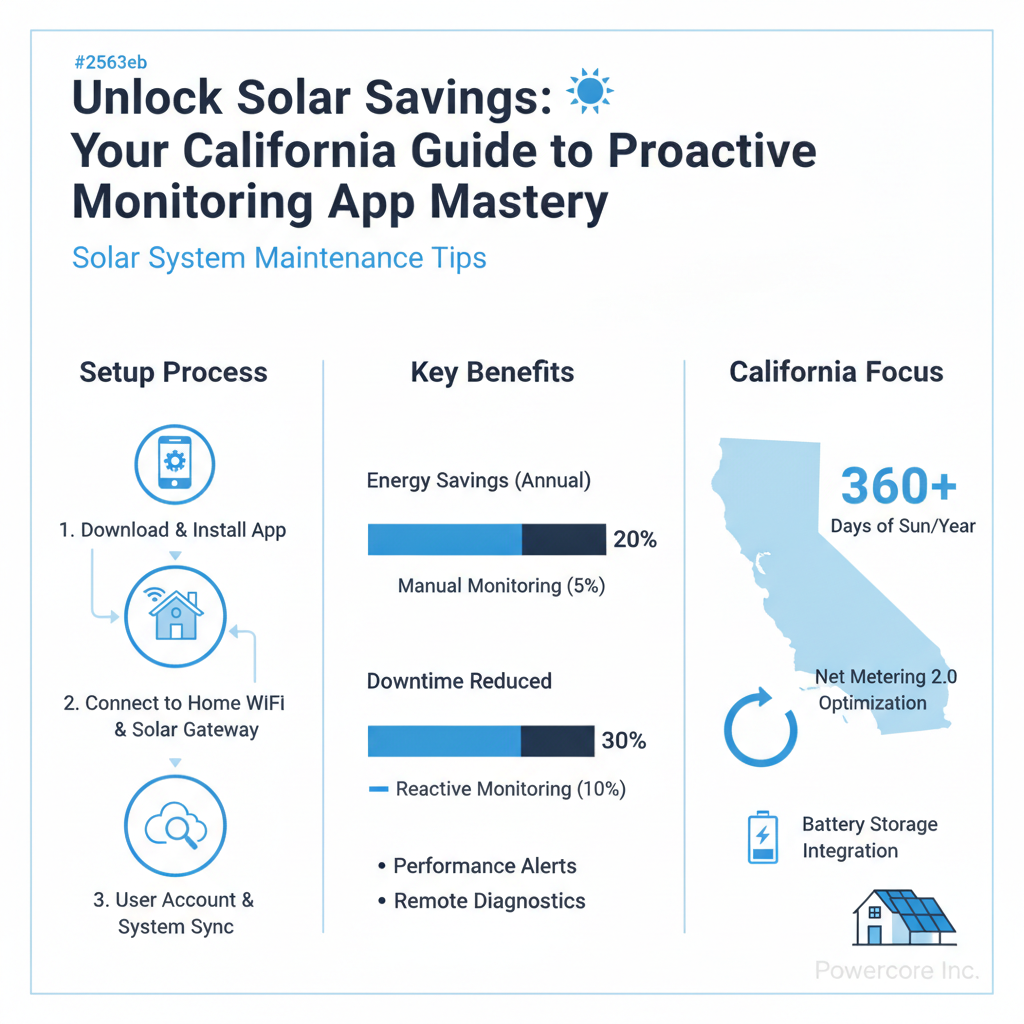
Proactive detection means quicker resolution, minimizing downtime and maximizing your system's output. Powercore Inc, with our C-10 Electrical Contractor license, is expertly equipped to diagnose and resolve any issues flagged by your monitoring app, ensuring your system operates at its best.
Optimizing for California Specifics: NEM & PSPS Resilience
For California homeowners, the app becomes a strategic tool for navigating the state's unique energy challenges:
- NEM Strategies: Under NEM 3.0, maximizing self-consumption and strategic battery usage is key. Your app helps you understand your export/import patterns, allowing you to fine-tune battery charging and discharging schedules to minimize grid reliance during expensive peak hours and maximize the value of your stored solar energy.
- PSPS Preparedness: If you have a battery storage system, your app often provides crucial information on its state of charge, how much backup power is available, and even manages the system's response during a grid outage. This insight is invaluable for maintaining comfort and essential services during a PSPS event.
Understanding these dynamics through your app translates directly into maximizing your investment's financial returns and enhancing your home's energy resilience.
The Initial Setup: Your Digital Dashboard Primer
While Powercore Inc handles the professional installation and initial system commissioning, setting up your personal monitoring app account is a crucial step for taking ownership of your solar investment. This process is generally straightforward, but verifying key details is essential.
Downloading and Account Creation
- Download the App: Your solar installer will typically inform you which app corresponds to your specific inverter and monitoring hardware (e.g., Enphase Enlighten, SolarEdge MySolarEdge, Tesla, etc.). Download it from your device's app store.
- Create an Account: Follow the on-screen prompts to create a new user account. This usually involves an email address, password, and sometimes a unique system ID provided by your installer.
- Link Your System: The app will guide you through linking your specific solar installation to your account. This might involve scanning a QR code, entering a serial number, or confirming your address.
- Grant Permissions: Allow necessary permissions for notifications, location services (if required for weather data integration), and data access.
Verifying Crucial Data Points Post-Setup
Once your account is set up and linked, take a moment to confirm that the displayed information accurately reflects your system. This initial verification is critical for ensuring your app functions correctly from day one.
- System Size: Does the app accurately display your total installed solar capacity (e.g., 8 kW, 12 kW)?
- Number of Panels: If your system includes panel-level monitoring, confirm the correct number of panels is registered.
- Location Data: Ensure your home's address and geographical coordinates are correct. This impacts weather data integration and performance estimates.
- Production Data: On a sunny day, verify that the app shows active energy production. Compare it against your expectations or the installer's estimates for the time of day.
- Consumption Data (if applicable): If you have consumption monitoring installed, check that the app is displaying your home's energy usage accurately. Turn on a major appliance and see if there's a corresponding spike in consumption.
- Battery Status (if applicable): For homes with battery storage, confirm that the app shows the battery's current state of charge and its operational status (charging, discharging, idle).
- Grid Interaction: On a day with excess solar production, confirm that the app shows energy being exported to the grid.
If anything seems incorrect or missing during this initial verification, don't hesitate to contact Powercore Inc. Our team can help troubleshoot communication issues or confirm system parameters, leveraging our extensive expertise as C-10 Electrical Contractors.
Decoding Your Data: Key Metrics to Track for Peak Performance
Your solar monitoring app presents a wealth of data, and understanding what each metric means is key to transforming raw numbers into actionable insights. Here’s a breakdown of the essential figures you should be tracking:
Production (kWh): Your Solar Output
This is the most fundamental metric. It tells you how much electricity your solar panels are generating. You'll typically see:
- Instantaneous Power (Watts/kW): A real-time reading of how much power your system is generating at this very moment. This fluctuates throughout the day based on sun intensity.
- Daily Production (kWh): The total energy generated over a single day.
- Historical Production (Weekly, Monthly, Annually, Lifetime kWh): Essential for tracking trends and comparing performance against previous periods or expected output.
What to look for: Compare your daily production to the previous day, week, or year. Significant, unexplained dips could indicate an issue. Factors like cloud cover, shading, or dirty panels will naturally affect this, but consistent underperformance warrants investigation.
Consumption (kWh): Your Home's Demand
If you have consumption monitoring, this metric reveals how much electricity your home is using in real-time and over various periods.
- Instantaneous Consumption (Watts/kW): What your home is drawing from all sources (solar, battery, grid) right now.
- Daily/Historical Consumption (kWh): Your total energy usage over time.
What to look for: Identify peak consumption times. Are you using a lot of energy when solar production is low, or when grid rates are highest? This data helps you strategically shift large appliance usage or EV charging to optimize for solar availability or lower TOU rates.
Net Metering/Export: Your Grid Interaction
This shows how much electricity you're sending back to the utility grid (exporting) and how much you're pulling from it (importing). Under NEM 3.0, the value of exported electricity has changed, making this metric even more critical.
- Export (kWh): Excess solar energy your home isn't using, sent to the grid.
- Import (kWh): Energy drawn from the grid when your solar production and battery (if applicable) can't meet demand.
- Net Meter (kWh): The difference between your total imports and exports over a billing cycle.
What to look for: Aim to minimize imports, especially during expensive peak hours. For NEM 3.0 customers, optimizing self-consumption is paramount. High export numbers during peak solar hours might indicate an opportunity to shift consumption or charge a battery more aggressively.
Battery State of Charge (SoC): Your Stored Power
For homes with battery storage, this is a vital indicator of your energy independence.
- Current SoC (%): The percentage of charge remaining in your battery.
- Charging/Discharging Status: Whether the battery is currently taking in power or releasing it.
What to look for: Ensure your battery is charging during periods of high solar production and discharging during peak grid rates or during outages. Monitor its performance during PSPS events to understand your backup capacity.
Financial Savings: Translating kWh to Dollars
Many apps offer an estimated financial savings feature, converting your solar production and grid avoidance into dollar figures. While these are often estimates, they provide a tangible sense of your investment's return.
Proactive Problem Solving: What Your App Can Tell You
Your solar monitoring app is your first line of defense against performance issues. Understanding common alerts and how to interpret unusual data patterns can save you money and ensure your system is always working its hardest.
Common App Alerts and Their Meaning
Most monitoring apps are designed to flag issues automatically. Here's what some common alerts might indicate:
- "System Offline" / "No Data Reporting": This is often a communication issue. It could mean your solar inverter has lost its Wi-Fi connection, or there's a problem with the monitoring hardware itself. While your system might still be producing power, you won't be able to see it.
- "Inverter Error" / "Fault Code": Your inverter, the brain of your solar system, has detected an internal issue. This could range from minor glitches to significant hardware failures. The app might display a specific error code which can be helpful for diagnosis.
- "Low Production" / "Performance Anomaly": The system's actual production is significantly lower than its expected production for the given weather conditions and time of year. This is a general alert that requires further investigation.
- "Panel Disconnected" (for microinverter/optimizer systems): If you have per-panel monitoring, this indicates that a specific solar panel or its associated microinverter/optimizer is no longer communicating or producing power.
Interpreting Performance Dips
Sometimes, your app won't issue an explicit alert, but you'll notice a drop in your daily or weekly production. Here's how to interpret it:
- Weather Related: Check your local weather history. Cloudy days, heavy rain, or even unusual fog can significantly reduce solar output. This is normal.
- Seasonal Changes: Solar production naturally varies with the seasons. Shorter days in winter mean less sunlight, and the sun's lower angle can introduce new shading patterns.
- Physical Obstructions: Look for new shading sources. A rapidly growing tree, a newly installed antenna, or even accumulated dirt and debris on your panels can cause a drop in performance. Powercore Inc recommends periodic professional cleaning, especially in dusty California environments.
- Equipment Fault: If the dip is persistent, localized to specific panels (with microinverters), or occurs on clear, sunny days, it's highly likely an equipment issue.
When to Call the Experts
While your app empowers you with data, it doesn't replace professional expertise. If you encounter any of the following, it's time to contact Powercore Inc:
- Persistent "System Offline" or Communication Errors: After basic troubleshooting (e.g., checking your home Wi-Fi), if the issue persists, our C-10 Electrical Contractors can diagnose and fix networking or hardware communication problems.
- Inverter Error Codes: These often require specialized knowledge and tools for diagnosis and repair or replacement.
- Consistent Low Production: If your system is consistently underperforming compared to historical data or expectations, even on sunny days, our team can conduct a comprehensive inspection to identify and resolve issues like faulty panels, wiring problems, or microinverter malfunctions.
- Individual Panel Underperformance: For systems with panel-level monitoring, if one or more panels consistently show zero or significantly lower production, it indicates a specific panel or optimizer issue that requires professional attention.
Attempting to troubleshoot complex electrical issues yourself can be dangerous and may void warranties. As your licensed California electrical contractor, Powercore Inc has the expertise to safely and effectively address all your solar system's technical needs.
Optimizing for California's Energy Landscape: NEM & Time-of-Use
California’s energy policies, particularly Time-of-Use (TOU) rates and the updated Net Energy Metering (NEM) 3.0, demand a strategic approach to energy management. Your solar monitoring app is the ultimate tool for navigating this complex environment and maximizing your financial benefits.
Strategic Consumption and Battery Management
Under NEM 3.0, the value of exporting solar energy back to the grid has significantly decreased for many homeowners. This makes maximizing self-consumption—using your solar energy directly in your home—paramount. Your app helps you achieve this by:
- Identifying Peak Production: Observe when your solar system generates the most power. This is your cue to run high-energy appliances like dishwashers, washing machines, or pool pumps.
- Shifting Consumption: Use your app's real-time consumption data to understand your home's energy patterns. Can you move energy-intensive tasks from expensive peak TOU hours (typically late afternoon/early evening) to midday when solar production is highest and grid rates are lower?
- Optimizing Battery Charge/Discharge: If you have battery storage, your app is crucial for setting up intelligent charge and discharge cycles. Program your battery to charge during peak solar production and discharge during peak TOU rates or when the grid is unreliable. This minimizes expensive grid imports and maximizes the value of your stored solar energy. Powercore Inc specializes in integrated solar and battery storage solutions tailored for California homes, and we can help you configure your system for optimal performance under NEM 3.0.
Monitoring EV Charging Impact
Electric vehicles are increasingly common in California, but their charging demands can significantly impact your home's energy profile. Your solar app allows you to:
- Track EV Charging Load: See the real-time energy draw of your EV charger.
- Align Charging with Solar: Schedule your EV charging during periods of high solar production to power your vehicle directly with clean energy and reduce reliance on the grid. This is particularly important for minimizing grid import costs under TOU rates.
Integrating EV charging with your solar and battery system is a smart move for California homeowners, and Powercore Inc has extensive experience installing and optimizing EV charging solutions as part of a comprehensive home energy strategy.
Understanding Grid Charges and True Savings
Beyond kWh production, your app, when combined with your utility bill, provides a clearer picture of your actual savings:
- Minimize Grid Imports: By using your app to shift consumption and manage your battery, you're actively reducing the amount of electricity you buy from the grid, directly impacting your utility bill.
- Analyze Export Value: For NEM 3.0 customers, the app helps you see when you're exporting energy and, combined with utility data, understand the lower compensation rates. This reinforces the importance of self-consumption.
Your app transforms you from a passive energy consumer into an active energy manager, a crucial shift for thriving in California's evolving energy landscape.
Advanced Features & Long-Term System Health
Beyond daily monitoring, your solar app offers capabilities that contribute to the long-term health and efficiency of your system, ensuring your investment continues to pay dividends for decades.
Setting Up Custom Alerts
Don't just wait for the app to tell you something's wrong; customize it to proactively notify you about specific conditions:
- Low Production Thresholds: Set an alert if daily production falls below a certain kWh target for a sunny day. This can help you catch subtle performance issues early.
- High Consumption Warnings: Get notified if your home's energy usage spikes unexpectedly, helping you identify forgotten appliances or inefficient systems.
- Battery State of Charge: Receive alerts if your battery drops below a critical percentage, especially useful during PSPS events or if you rely on it for peak-shaving.
These custom alerts empower you to respond quickly, often before minor issues escalate into costly problems.
Historical Data Analysis for Trends
One of the most powerful features of your monitoring app is its access to historical data. Don't just look at today's numbers; analyze trends:
- Seasonal Performance: Understand how your system performs across different seasons. Compare this year's summer production to last year's.
- Degradation Tracking: Over time, solar panels experience a slight decrease in efficiency (degradation). By tracking annual production trends, you can monitor this natural process and ensure your system is degrading within expected parameters.
- Impact of Changes: Did you trim a tree? Did a new building go up nearby? Use historical data to assess the impact of these changes on your solar production.
This long-term perspective helps you understand the true performance curve of your system and anticipate future maintenance needs.
Integrating with Smart Home Systems
Many modern solar monitoring apps offer integration capabilities with broader smart home ecosystems (e.g., Google Home, Amazon Alexa, IFTTT). This can open up new avenues for automation:
- Voice Commands: "Alexa, what's my solar production right now?"
- Automated Appliance Control: Use "if this, then that" (IFTTT) rules to automatically turn on smart appliances when solar production is abundant.
The Role of Professional Maintenance
While your app is an incredible diagnostic tool, it's not a substitute for professional solar maintenance. Regular inspections by a qualified contractor are essential for optimal system health. Powercore Inc recommends annual or biennial check-ups that include:
- Physical Inspection: Checking for panel damage, loose wiring, corrosion, or pest infestations.
- Inverter Health Check: Verifying inverter performance and firmware updates.
- Electrical System Integrity: Ensuring all electrical connections are secure and up to code, leveraging our C-10 Electrical Contractor expertise.
- Panel Cleaning: Removing dirt, dust, and grime that can significantly reduce efficiency, especially in areas prone to wildfires or agricultural dust.
- Shading Assessment: Identifying new or increased shading that might warrant tree trimming or other solutions.
By combining the insights from your solar monitoring app with the expert service of Powercore Inc, you ensure that your California home's solar system performs reliably and efficiently for its entire lifespan. Our General B license also means we understand how solar integrates with your entire home, offering holistic solutions.
Conclusion: Powering Your Future with Powercore Inc
Your solar monitoring app is more than just a gadget; it's an indispensable tool for every California homeowner with solar panels. It empowers you with the knowledge to understand your energy production and consumption, detect issues early, optimize for the state's unique energy policies, and ultimately, maximize the financial and environmental benefits of your solar investment.
From the initial setup to decoding complex data and leveraging advanced features, mastering your app allows you to take proactive control of your home's energy future. And when you need expert assistance – whether for advanced diagnostics, repairs, or integrating new technologies like battery storage or EV charging – Powercore Inc is here to help. As a dual-licensed General B & C-10 Electrical Contractor based in Roseville, CA, and serving all of California, we are your trusted partner for all things solar and home energy.
Don't let your solar investment operate on autopilot. Take command with your monitoring app and partner with Powercore Inc for unparalleled expertise and service. Ready to ensure your solar system is always performing at its peak? Contact Powercore Inc today at 916-699-8778 for a consultation or service request. Let us help you unlock the full potential of your solar power system.