

Introduction: Unlocking Your Solar System's Full Potential
California homeowners are increasingly embracing solar energy, not just for environmental benefits but for significant savings on utility bills and enhanced energy independence. A solar system is a substantial investment, and like any investment, it requires diligent oversight to ensure it performs optimally and delivers maximum returns. While physical maintenance is crucial, the first and most powerful tool in your solar maintenance arsenal is often overlooked: your solar monitoring app.
Imagine having real-time insight into your system's performance, understanding your energy consumption patterns, and even detecting potential issues before they escalate – all from the palm of your hand. This isn't a futuristic dream; it's the reality offered by modern solar monitoring applications. For Powercore Inc, a dual-licensed General B & C-10 Electrical Contractor serving all of California, we've seen firsthand how empowered homeowners who master their monitoring apps achieve greater satisfaction and longevity from their solar installations.
This comprehensive guide will walk you through everything you need to know about setting up, understanding, and mastering your solar monitoring app. We'll dive into key metrics, proactive maintenance strategies, and how to leverage this digital tool to ensure your California home's solar system consistently delivers peak performance, year after year.
Why Your Solar Monitoring App is Essential for California Homeowners
In the dynamic energy landscape of California, simply having solar panels isn't enough. The state's transition to Net Energy Metering (NEM 3.0), time-of-use (TOU) rates, and increasing demand for energy resilience make active monitoring more critical than ever. Your solar monitoring app transforms complex energy data into actionable insights, providing benefits that extend far beyond simple production numbers.
Proactive Maintenance and Troubleshooting
- Early Detection of Issues: The app can alert you to performance discrepancies caused by anything from a dirty panel to an inverter malfunction. Catching these issues early can prevent significant energy losses and costly repairs down the line.
- Performance Baseline: By tracking your system's historical data, you can establish a baseline for expected performance. Any significant deviation can signal a problem requiring attention.
Financial Insight and ROI
- Track Savings: See exactly how much electricity your system is generating and how much you're saving on your utility bills. This direct feedback reinforces the value of your solar investment.
- Optimize Self-Consumption: For NEM 3.0 customers, understanding when your system produces and when your home consumes energy is vital. The app helps you align your usage with production to maximize self-consumption and minimize reliance on the grid during expensive peak hours.
- Battery Management: If you have battery storage, your app provides crucial data on charge/discharge cycles, state of charge, and how your battery is offsetting peak demand, optimizing its lifespan and utility.
Energy Independence and Resilience
- Real-Time Grid Interaction: Understand your net metering status, whether you're exporting excess energy to the grid or drawing power during low-production periods.
- Outage Preparedness: For systems with battery backup, the app often shows your system's status during an outage, indicating how much power you're drawing from batteries and estimated remaining backup time.
Understanding Your Solar Monitoring System: The Tech Behind the App
Before you dive into the app, it's helpful to understand the basic technology that collects the data. Your solar monitoring app is the user-friendly interface for a sophisticated network of hardware.
How Data is Collected
- Inverters: The central brain of your solar system, inverters convert DC power from your panels into usable AC power for your home. Most modern inverters (string inverters or hybrid inverters) have built-in monitoring capabilities.
- Microinverters/Power Optimizers: Systems with microinverters (e.g., Enphase) or power optimizers (e.g., SolarEdge) monitor the performance of each individual panel. This granular data is a game-changer for pinpointing specific panel issues.
- Smart Meters/CT Clamps: Current Transformers (CT clamps) are installed at your electrical panel to measure your home's energy consumption. This data, combined with production data, gives you a full picture of your energy flow.
- Communication Gateway: A small device (often called a Gateway, Envoy, or similar) connects your solar equipment to your home's internet, sending data to the manufacturer's cloud platform, which then feeds your mobile app.
Common Monitoring Platforms
While the specific app features vary, most systems utilize major platforms:
- Enphase Enlighten App: Known for its detailed, panel-level monitoring and intuitive interface, popular with Enphase microinverter systems.
- SolarEdge Monitoring App: Offers comprehensive data for SolarEdge inverter and power optimizer systems, including panel-level performance.
- Tesla App: Integrates solar panel, Powerwall battery, and EV charging data into a single, unified experience.
- Generac PWRview/PWRcell App: For Generac solar and battery storage systems, providing detailed energy insights.
- Various Inverter Manufacturer Apps: Many other inverter brands (e.g., Fronius, SMA, Sol-Ark) offer their own monitoring solutions.
No matter your system, the core functionality of tracking production and performance remains consistent.
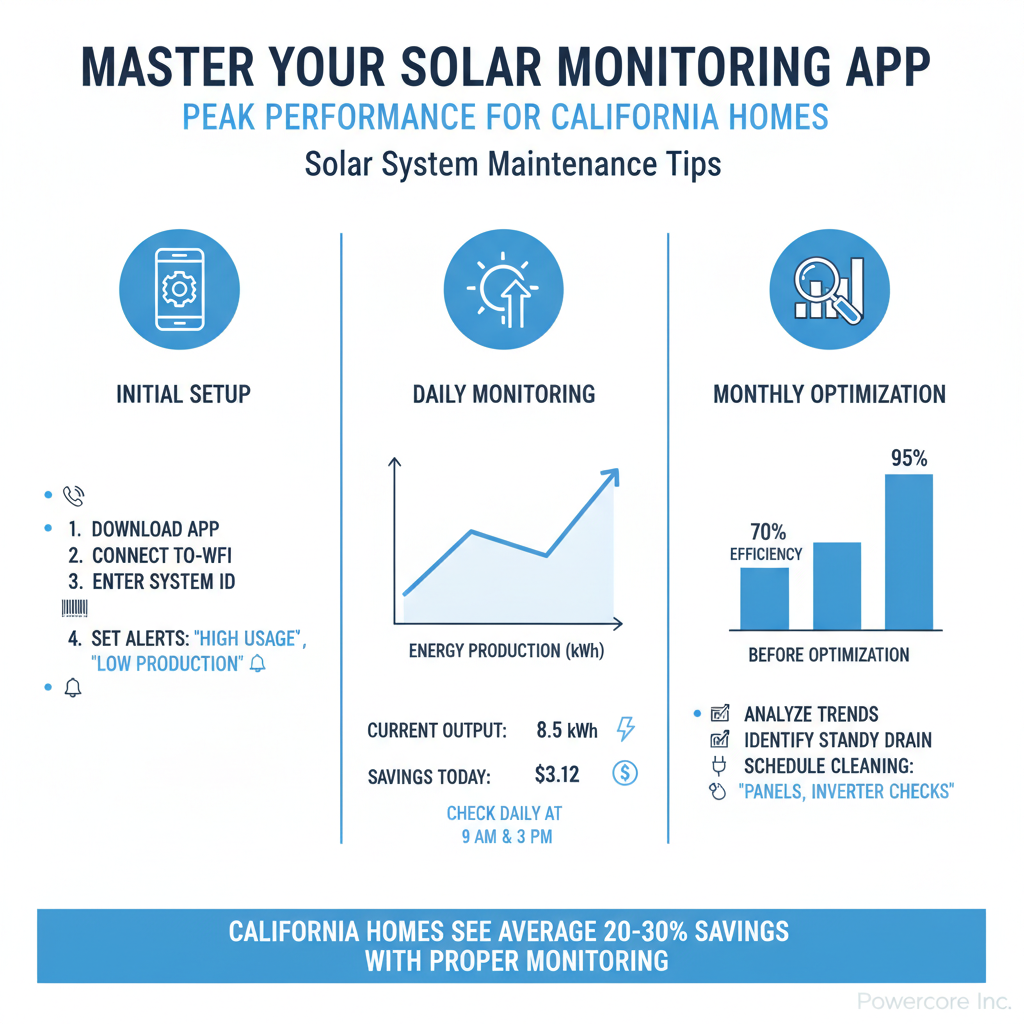
Setting Up for Success: Initial App Configuration
Your journey to solar mastery begins with proper app setup. Powercore Inc ensures that your system is correctly commissioned and connected during installation, but familiarizing yourself with the app's initial setup is key to leveraging its full power.
Downloading and Logging In
- Locate Your App: Your installer (like Powercore Inc) will inform you which monitoring app corresponds to your system. Search for it on the Apple App Store or Google Play Store.
- Credentials: You should receive login credentials (username/email and password) from your installer or the system manufacturer. If not, contact your installer for assistance.
- First Login: Follow the on-screen prompts. You may be asked to verify your account or set up a new password.
Personalizing Your Dashboard
Most apps offer customizable dashboards. Take advantage of this to prioritize the information most important to you:
- Key Metrics: Ensure your daily production, consumption (if applicable), and battery status are prominently displayed.
- Date Ranges: Easily switch between daily, weekly, monthly, and annual views to track trends.
- System Layout: Some apps graphically represent your solar array, allowing you to see individual panel performance.
Setting Up Alerts and Notifications
This is where the proactive power of your app truly shines. Configure alerts to notify you of:
- Production Anomalies: A significant drop in expected energy generation.
- System Errors: Inverter faults, communication issues, or specific panel malfunctions.
- Battery Status: Low battery warnings, or notifications when your battery is fully charged/discharged.
- Grid Outages: If your system includes battery backup, you might receive alerts when your home switches to backup power.
Don't overwhelm yourself with too many notifications, but ensure critical alerts are enabled to keep you informed without constant interruptions.
Key Metrics to Monitor for Peak Performance
To truly master your solar monitoring app, you need to understand what the numbers mean and how to interpret them. Here are the essential metrics to track:
Real-Time Production and Historical Data
- Current Power (kW): This shows how much electricity your system is generating at any given moment. Watch for spikes during peak sun hours and drops due to shading or cloudy weather.
- Energy Produced (kWh): This is the total amount of electricity generated over a period (day, month, year). Compare this to your historical data and expected output for your system size and location.
- Lifetime Production: A cumulative total, useful for long-term tracking of your system's overall contribution.
Consumption and Net Metering Data
If your system includes consumption monitoring, these metrics are invaluable, especially under California's NEM 3.0 rules:
- Home Consumption (kWh): The total electricity your home is using.
- Energy from Grid (kWh): How much electricity you're importing from your utility.
- Energy to Grid (kWh): How much excess solar electricity you're exporting.
- Net Usage/Export: The difference between energy imported and exported. Under NEM 3.0, maximizing self-consumption is key to optimizing savings, making this data crucial.
Battery Storage Status
For homes with battery backup, your app will display:
- State of Charge (SoC): The current percentage of your battery's capacity.
- Charge/Discharge Power (kW): How quickly your battery is charging from solar or discharging to power your home.
- Battery Activity: Historical data on when your battery charged, discharged, and how much energy it provided.
System Health and Alerts
This section is paramount for proactive maintenance:
- Inverter Status: Indication of whether your inverter is operational, in standby, or reporting an error.
- Panel-Level Performance: If applicable, you can view the output of individual solar panels, making it easy to spot a single underperforming panel due to shading, dirt, or a malfunction.
- Communication Status: Ensures your gateway is connected to the internet and communicating data effectively.
Environmental Factors
Many apps integrate local weather data, allowing you to correlate production dips with cloudy days, rain, or even extreme heat, helping you understand natural fluctuations versus potential system issues.
Proactive Maintenance Through Your App: Becoming Your System's Best Advocate
Your solar monitoring app isn't just a dashboard; it's a diagnostic tool that empowers you to be an active participant in your system's longevity and efficiency. Regular app checks are the first line of defense against performance degradation.
Identifying Performance Anomalies
- Sudden Production Drops: A sharp, unexplained drop in daily production that isn't attributable to weather or time of year is a red flag.
- Consistent Underperformance: If your system consistently produces less than its historical average or expected output for similar conditions, investigate further.
- Individual Panel Discrepancies: For systems with microinverters or optimizers, compare panel outputs. A single panel consistently producing significantly less than its neighbors points to an issue with that specific unit.
- Inverter Error Codes: Your app will often display error codes directly from your inverter. Note these down immediately.
Recognizing Potential Issues Before They Become Major Problems
By regularly reviewing your data, you can spot trends:
- Gradual Decline: A slow, steady decrease in overall production might indicate dirty panels requiring a cleaning, or aging components.
- Inconsistent Output: Fluctuations that don't align with weather patterns could suggest loose connections or intermittent component failures.
- Shading Impact: Over time, new trees or structures can cause unexpected shading. Your app data will clearly show the impact on production at certain times of day.
Scheduling Professional Check-Ups Based on Data Insights
While your app helps you identify potential problems, some issues require professional intervention. This is where experts like Powercore Inc come in. If your app indicates a persistent problem:
- Document Everything: Take screenshots of error messages, production graphs, and any unusual data. This information is invaluable for technicians.
- Contact Powercore Inc: As a licensed C-10 Electrical Contractor, Powercore Inc has the expertise to diagnose and repair any solar system issues. Share your app data with our team; it helps us pinpoint the problem quickly and efficiently, saving you time and money.
- Regular Preventative Maintenance: Even without an apparent issue, consider periodic professional inspections. Your app data can help schedule these when it makes the most sense.
Optimizing Your Energy Strategy with App Data
Beyond maintenance, your monitoring app is a powerful tool for strategic energy management, especially crucial for California residents navigating complex utility rates.
Adjusting Usage Habits Based on Production
Under California's Time-of-Use (TOU) rates, electricity is more expensive during peak evening hours. Your app can help you:
- Shift High-Demand Activities: Run dishwashers, washing machines, and charge EVs during midday when your solar production is highest and grid electricity is cheapest (or you're exporting power).
- Pre-cool Your Home: If you have AC, pre-cool your home during solar peak hours to reduce demand when rates are higher.
Maximizing Self-Consumption and Grid Export
For NEM 3.0 customers, optimizing self-consumption is paramount. Your app helps you visualize:
- Periods of Excess Production: Identify times when you are consistently exporting a lot of power. This is an opportunity to shift consumption or consider adding battery storage.
- Periods of High Imports: Pinpoint when you are drawing heavily from the grid, indicating where you could improve efficiency or leverage stored power.
Understanding NEM 3.0 Implications for Time-of-Use
Your app's detailed consumption and production data are essential for understanding your energy credits and debits under NEM 3.0. By comparing your energy generation to your usage across different TOU periods, you can make informed decisions to minimize your monthly true-up bill.
Integrating with Smart Home Devices
Some advanced monitoring apps or systems allow integration with smart thermostats, EV chargers, and other home automation devices, enabling even more sophisticated energy management based on your solar production.
Troubleshooting Common Issues with Your Monitoring App
While sophisticated, solar monitoring apps can occasionally encounter hiccups. Knowing how to address common issues can save you a service call.
"No Production" Data or Offline Status
- Check Internet Connection: The most common culprit. Ensure your home's Wi-Fi is working, and the communication gateway for your solar system is connected. Sometimes a simple router reboot can resolve this.
- Verify Inverter Status: Check the physical inverter for any error lights or messages on its display. It might be in standby, or have a fault.
- Power Cycle the Gateway: Locate the communication gateway (often near your inverter or electrical panel) and try power cycling it (unplug for 30 seconds, then plug back in).
"Low Production" Readings
- Weather Check: Compare your current production to similar weather conditions historically. Cloudy, rainy, or hazy days will naturally reduce output.
- Shading: Look for new shading sources – growing trees, new construction, or even temporary objects.
- Dirty Panels: Dust, pollen, bird droppings, and soot (especially in fire-prone California regions) can significantly reduce efficiency. A professional cleaning might be in order.
- Individual Panel Issue: If your app offers panel-level monitoring, check if only one or a few panels are underperforming. This points to a specific microinverter or optimizer issue.
App Connectivity Problems
- Update App: Ensure your app is updated to the latest version.
- Clear Cache/Reinstall: For persistent issues, try clearing the app's cache or reinstalling it.
- Phone Settings: Check if your phone's battery optimization settings are interfering with the app running in the background.
When to Call the Professionals
While self-troubleshooting is helpful, some issues require expert intervention. If you've exhausted basic steps and your app continues to show errors, or if you notice significant, unexplained production losses, it's time to contact a qualified solar contractor. Powercore Inc specializes in diagnosing and repairing all types of solar system issues across California. Our team can leverage your app data to quickly identify the root cause, whether it's an inverter fault, a wiring issue, or a compromised panel, and restore your system to optimal performance.
Beyond Basic Monitoring: Advanced Features & Future Trends
Solar monitoring apps are continually evolving, offering increasingly sophisticated features to optimize your energy ecosystem.
Predictive Analytics
Some advanced systems use historical data and weather forecasts to predict future solar production and even suggest optimal times for energy-intensive activities or battery charging.
AI Integration
Artificial intelligence is beginning to play a role in optimizing energy flow, learning your usage patterns, and making autonomous decisions to maximize savings or energy resilience, especially for homes with battery storage and smart devices.
Community Energy Sharing
While still emerging, concepts like virtual power plants (VPPs) and community solar initiatives may one day integrate with your monitoring app, allowing you to share or trade excess energy with neighbors, further decentralizing and democratizing power.
Why Choose Powercore Inc for Your California Solar Needs
At Powercore Inc, we believe that understanding your solar system is just as important as having a high-quality installation. As a leading California dual-licensed General B & C-10 Electrical Contractor, we pride ourselves on providing comprehensive solar solutions, from initial design and installation to ongoing support and maintenance. Our expertise ensures not only that your solar system is installed to the highest standards but also that you are fully equipped to monitor and manage its performance effectively through your monitoring app.
We serve homeowners throughout all of California, offering a wide range of services including solar, battery storage, HVAC, roofing, ADUs, remodels, EV charging, siding, decking, and interior remodeling. When you choose Powercore Inc, you're choosing a partner committed to your home's long-term energy efficiency and value.
Conclusion: Your Solar System, Your Control
Your solar monitoring app is more than just a gadget – it's your personal window into your home's energy ecosystem. By taking the time to set it up correctly, understand its key metrics, and leverage its capabilities for proactive maintenance and strategic energy management, you transform from a passive solar owner into an empowered energy manager. This mastery ensures your California solar investment performs at its peak, maximizes your savings, and provides reliable, clean energy for years to come.
Don't let your solar system operate in the dark. Embrace the power of your monitoring app and take control of your energy future. For expert solar installation, maintenance, or any questions about optimizing your home's energy performance in California, contact Powercore Inc today at 916-699-8778. Let us help you unlock your solar's full potential.